May Update
1747149715801
May Updates
🔐 Introducing ePAM: Smarter Admin Access, Built for You
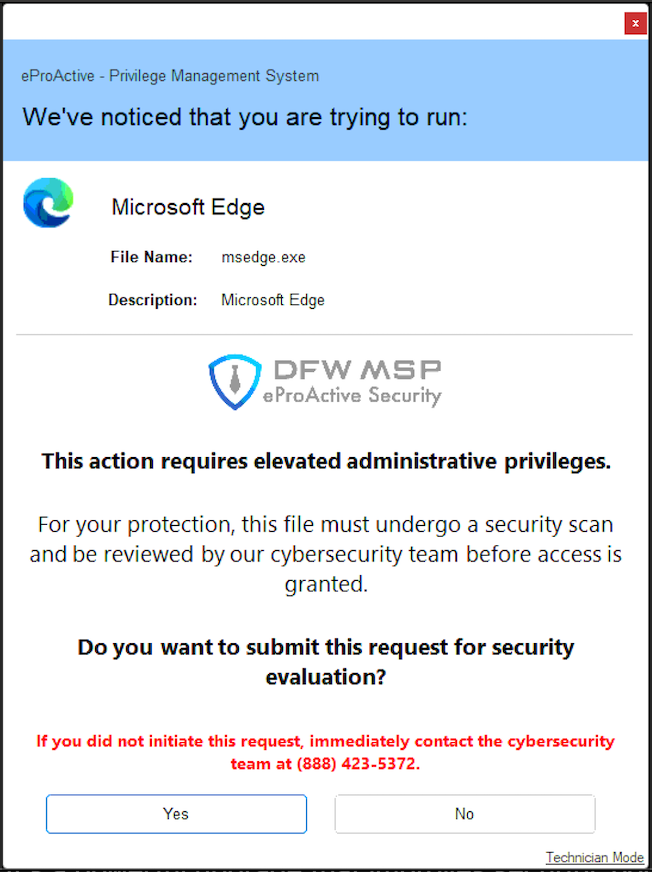
We’re excited to roll out ePAM, our new Privileged Access Management (PAM) solution, which is now fully integrated into your support experience with DFWMSP.
ePAM helps your team work faster while keeping your systems secure and compliant.
 | ✅ For Your Team:
|
💼 For Business Owners and Managers:
Stronger Security Posture
By eliminating permanent admin access, ePAM reduces your company’s exposure to ransomware, malware, and internal misuse.
Compliance-Ready Controls
Every elevation request is tracked and logged to support audit requirements and security standards.
Lower IT Support Costs
ePAM reduces the number of support tickets related to software installs and access issues — saving your business both time and money.
ePAM is now active and included in your managed service plan. It’s a powerful upgrade that improves security, boosts productivity, and cuts unnecessary support costs — all with zero disruption to your team.
⚙️ Service | eProActive
— Upgrade 8.1: Powerful macOS Management Now Live
We’ve upgraded our eProActive platform to version 8.1, bringing major improvements for businesses using Apple devices — especially macOS. These new features make device management smoother, more secure, and more hands-off for your team.
🚀 Now Managing macOS with Full MDM Support
We can now fully manage macOS devices using the same powerful tools we use for iPhones and iPads. This means:
Faster onboarding of new Macs
Automatic approval of privacy permissions and system extensions
Streamlined OS updates pushed from our management console
Remote lock and erase options in case of lost or decommissioned Macs
This adds another layer of protection and hands-free IT to your Apple environment.
🛠️ Enhanced Controls for iOS & Android Devices
We’ve simplified Android setup and app management, making it faster to deploy and support Android work devices.
Apple MDM profiles are now digitally signed, ensuring trust and integrity during deployment.
New visual improvements and platform filters help us manage your mobile fleet more efficiently.
💻 Smoother Experience for Mac Users
When macOS devices are both agent and MDM-enrolled, we now see more detailed insights like:
Agent and MDM enrollment dates
Last MDM update
Real-time status after lock or erase actions
We’ve also automated the installation of the eProActive agent during Mac enrollments — simplifying setup for your users.
🐞 Bug Fixes and Stability Improvements
Fixed display and filtering issues in the device dashboard for MDM-enrolled Macs.
Improved support for large Apple device inventories.
Strengthened policy validation to prevent misconfigurations.
Corrected minor glitches with system extensions and patch approvals.
What does this mean for you?
Better control, faster support, stronger protection — especially for companies using Macs and mobile devices.
🔧 Service | eRemote
— Upgrade 25.2.3.9216
We’ve made some key improvements to the eRemote platform, helping you work smarter and more securely:
Improved Multi-Tech Support
When more than one technician connects to a machine using different sessions, eRemote handles this more smoothly, reducing confusion and improving support efficiency.
Blank Screen Image for Mac Users
Mac users will now see a clearer “blank monitor” image when screen blanking is enabled during remote sessions — creating a more polished experience.
Security and Privacy Boosts
Web login cookies now include additional security flags.
Bug Fixes & Performance Tweaks
Resolved wallpaper reset issues in multi-monitor setups.
Eliminated input delays seen in some earlier builds.
Improved session group reliability and access filters.
Compatibility fixes for Windows 7/Server 2008 logoffs and macOS Catalina/Big Sur installers.
These changes improve security, enhance remote support workflow, and polish the user experience across host and guest machines.
Did you like this update?


Leave your name and email so that we can reply to you (both fields are optional):